

Instagram Instants; Instagram launched a new feature called Instants on May 13, 2026. It is a disappearing photo feature built directly into your Instagram DMs. Meta describes it as a quick, casual way to share unfiltered moments with your Close Friends or mutual followers. The photos disappear after being viewed and cannot be seen after 24 hours. It is available inside the Instagram app and also as a standalone app being tested in select countries.
In this article you will get to know about what is Instagram Instants, How It Works and How to Turn It Off.
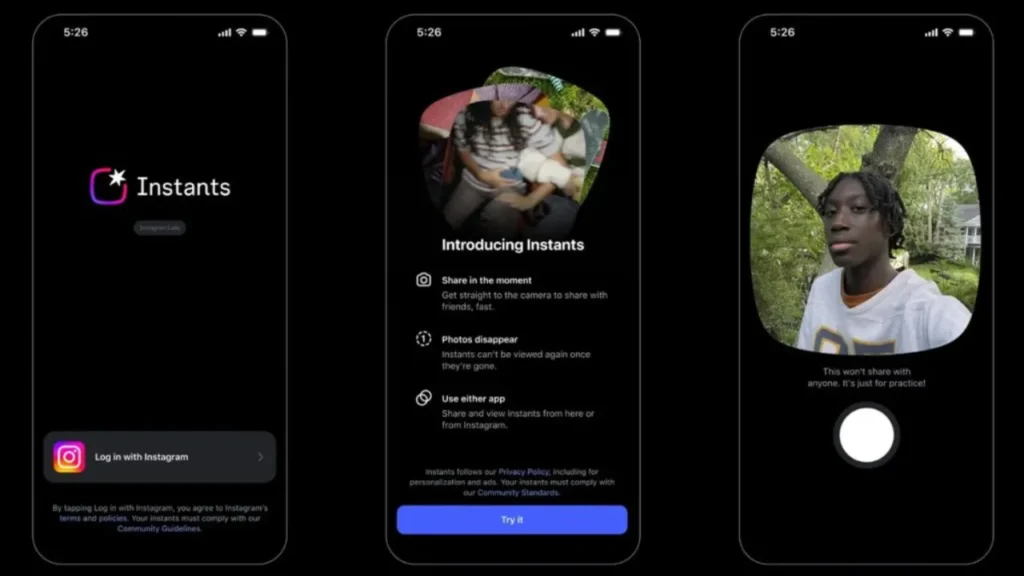
What Is Instagram Instants
Instants is a new way to share photos on Instagram without editing or filtering them. You take a photo using Instagram’s in-app camera and send it to your Close Friends list or mutual followers. The photo disappears once the person opens it and expires completely within 24 hours whether opened or not. There is no viewers list so you cannot see who has viewed your instant. Reactions and replies go straight to your DMs and are private.
The feature sits inside your DM inbox. It looks like a small pile of photos in the bottom right corner of your inbox. You tap that pile to open the Instants camera and take a photo. You can add a caption but you cannot add filters, stickers, or edit the photo in any way. You also cannot upload a photo from your camera roll. It has to be taken live inside the app.
How to Use Instagram Instants
Open Instagram and go to your DMs. Look for the small pile of photos in the bottom right corner of your inbox. Tap it to open the Instants camera. Take a photo. Add a caption if you want. Choose to share with Close Friends or mutual followers. Send it. That is it. The whole process takes a few seconds. There are no editing tools and no extra steps. The idea is to keep it quick and simple.
If you share an instant by mistake, an undo button appears immediately after you send it. Tap undo before anyone sees it and the photo is taken back. Once someone has seen it, you cannot undo it.
Where Instagram Instants are Saved
Even though Instants disappear for viewers, they are saved in your own archive for up to one year. You can go back and look at your own instants in your archive. You can also reshare them as a recap on your Stories by tapping a button in the archive tab. This means your instants are not gone forever on your end only the recipients lose access after viewing.
Standalone Instants App
Along with the Instagram feature, Meta also launched a standalone Instants app. It opens directly to the Instants camera for quicker access without going through the main Instagram app. The standalone app is currently being tested in select countries. Teen account protections and Family Center settings apply to the standalone app, including shared time limits, Sleep Mode, and parental supervision.
Also read; http://Who Decides What AI Tells You? Campbell Brown Says Accuracy Needs More Attention
http://Apple iOS 26.5 Update- Latest Features, Release Date and How to Install on Your iPhone
How to Turn Off Instagram Instants
Many users accidentally sent photos when they tapped the pile icon without understanding what it was. If you want to turn off Instants, go to your Instagram Settings, then Privacy, then Instants. You can turn off the feature from there. You can also change who can send you Instants — Close Friends only, mutual followers, or no one. If you already sent an instant by mistake, use the undo button straight after sending or go to your archive and delete it.
Is Instagram Instants similar to Snapchat
Yes, and many users have pointed this out. The disappearing photos, no screenshot option, and casual unfiltered format are all features Snapchat built its name on. Instagram Instants also takes ideas from BeReal and Locket. Instagram is not the first to do this but it has a much larger user base, which means more people will use it whether they want to or not. The difference is that Instants lives inside an app most people already use every day.
When did Instagram launch Instants?
Instagram launched Instants globally on May 13, 2026.
How long do Instants last?
Instants disappear after the recipient opens them. They expire completely within 24 hours even if not opened.
Can someone screenshot an Instant?
No. Instants cannot be screenshotted.
Can I edit an Instant before sending?
No. You can only add a caption. No filters, stickers, or edits are allowed. Photos must be taken live inside the app and cannot be uploaded from your camera roll.
How do I turn off Instagram Instants?
Go to Settings, then Privacy, then Instants. You can turn it off or change who can send you Instants from there.